
Where to save things you want to buy later
Save the product link to one list instead of leaving another tab open. In SendCart, a personal cart keeps the product, store, price, and your notes together. If you cannot share a link, you can start with a screenshot.
From a find to a saved product
Start with the product page
Open the item you are considering, including the size, model, or colour you want. Share its public link to SendCart, or copy the address and add it in the app. A link gives you a way back to the retailer.
Use a screenshot when a link is unavailable
Choose a clear screenshot with the product name, store, and visible price. Crop away messages, addresses, payment details, and other unrelated information before sharing it. SendCart can use the image to help fill in the product details.
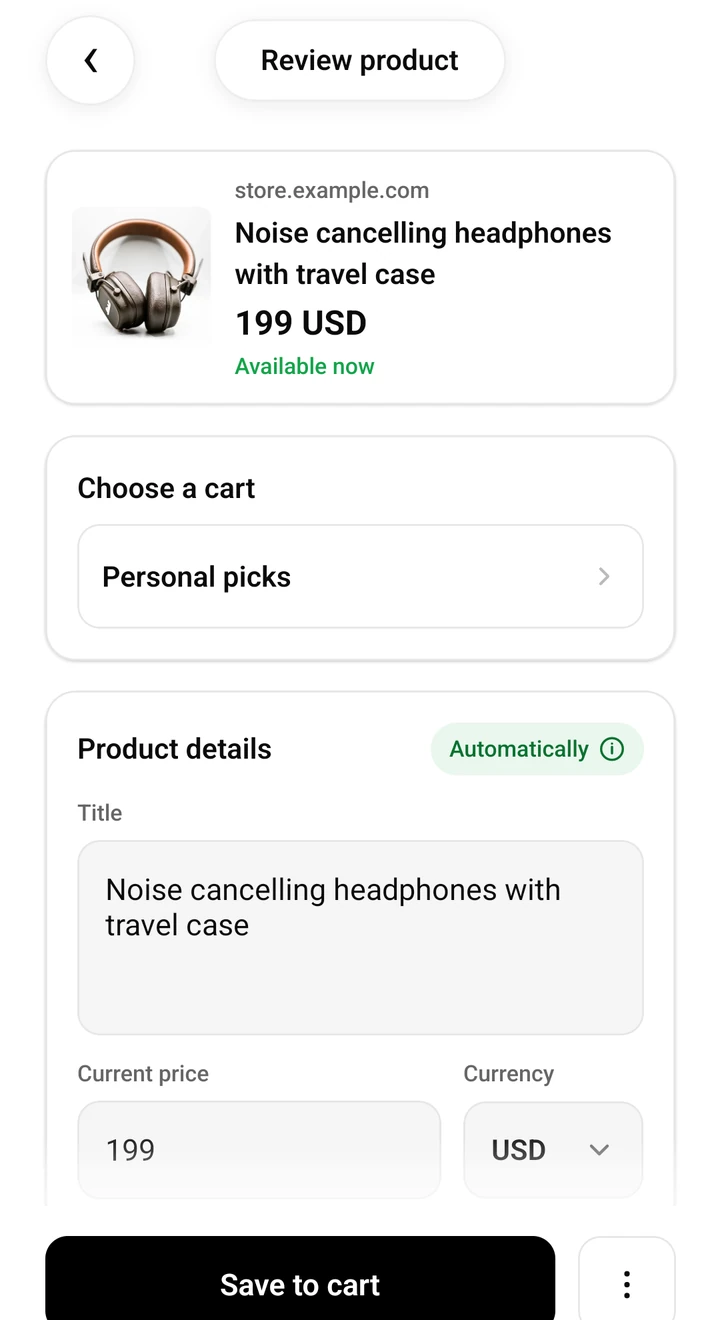
Check the detected details
Review the title and price before saving. Make sure they describe the item you meant to keep, rather than another product or a delivery fee. Correct anything that was not recognised properly.
Choose a cart and leave yourself a note
Keep personal ideas in a personal cart or put a household purchase in a shared cart. A note such as ‘measure the shelf first’ preserves the reason you have not bought it yet.
Keep enough context to close the tab
A useful saved item answers three questions: what is it, where did you find it, and why are you considering it? A photo alone may not answer the last two. Keep the original address whenever possible and add details that matter to your decision.
For example, if you are choosing a kettle, a note about capacity or available counter space may help more than saving several nearly identical pictures. You can return to the cart when you have the information you need.
Saving a picture and tracking a price are different steps
You can save a screenshot without a product URL. Automatic price tracking, however, needs a public product link that SendCart can check. Add the retailer’s product address if you also want to follow the price.
Before you rely on the list
- Some store pages cannot be read, or may return incomplete details. Review the result before saving.
- A saved screenshot is a record of what you saw; it is not a live price feed.
- Saving a product does not reserve stock or place an order. Confirm the final price and availability with the retailer.
Keep your next find in SendCart
Available on iOS and Android, and on your computer as an extension for Chrome and Firefox. Save a product, check its details, and buy from the original retailer when you are ready.


